TallyMint: See your actual bank balance, 90 days ahead.

Every account projected day by day, with your bills, paychecks, and budget on the calendar, so you know what is safe to spend before you spend it. Run it as a Windows app you buy once, or in any browser as a subscription. Bank sync, budgets, and reports either way.

Get TallyMint from the Microsoft Store
$49.99 once for Windows
Or from $12.99/month in any browser
Free trial either way

Choose how you run TallyMint

Same app, same features, same numbers. The difference is where it runs, where your data lives, and how you pay.

TallyMint Desktop $49.99 once

A native Windows app. Your data lives in a single encrypted file on your own PC, and the app keeps working whether or not you ever pay us again.

  • Buy it once. No subscription, ever.
  • Your data never leaves your computer
  • Works fully offline
  • Bank sync with your own SimpleFIN key, or OFX direct from your bank
  • 30-day free trial, no credit card

Windows 10 & 11

TallyMint Web New $12.99 /month

The same app in your browser, on any computer, tablet, or phone. We run the server and handle the bank connections, so there are no keys to set up and nothing to install.

  • Nothing to install. Works on Windows, Mac, Linux, tablets, and phones
  • Bank connections included, through Plaid
  • Your data is backed up and available on every device you sign in from
  • Investment prices included, for synced and hand-entered holdings alike
  • 7-day free trial, card required, cancel any time

Any modern browser · US banks

Not sure? Compare them side by side. If you are not on a Windows PC, TallyMint Web is the one for you, and either way your data can move between them later.

What is TallyMint?

TallyMint (also written Tally Mint) is personal finance software that comes in two forms: a Windows desktop app you buy once for $49.99, and TallyMint Web, a hosted version you subscribe to and run in any browser. Both handle bank sync, budgets, recurring bills, a monthly bills calendar, savings goals, loan amortization, investment tracking with cost basis and capital gains, cash flow projections, and reports. Buy the desktop app and your data stays in a single encrypted file on your own PC, with no subscription and no account to create. Subscribe to TallyMint Web and we run the server and the bank connections for you, so it works on any device you can open a browser on.

Personal finance software with everything you need. Nothing you don't.

Built by someone who actually uses it every day to manage their own money. Every feature below is in both the Windows app and the web app.

Bank Sync

Connect your bank and credit cards. Transactions download automatically and match against your manual entries. Connections come included on the web; on desktop you bring your own SimpleFIN key.

Bills & Calendar

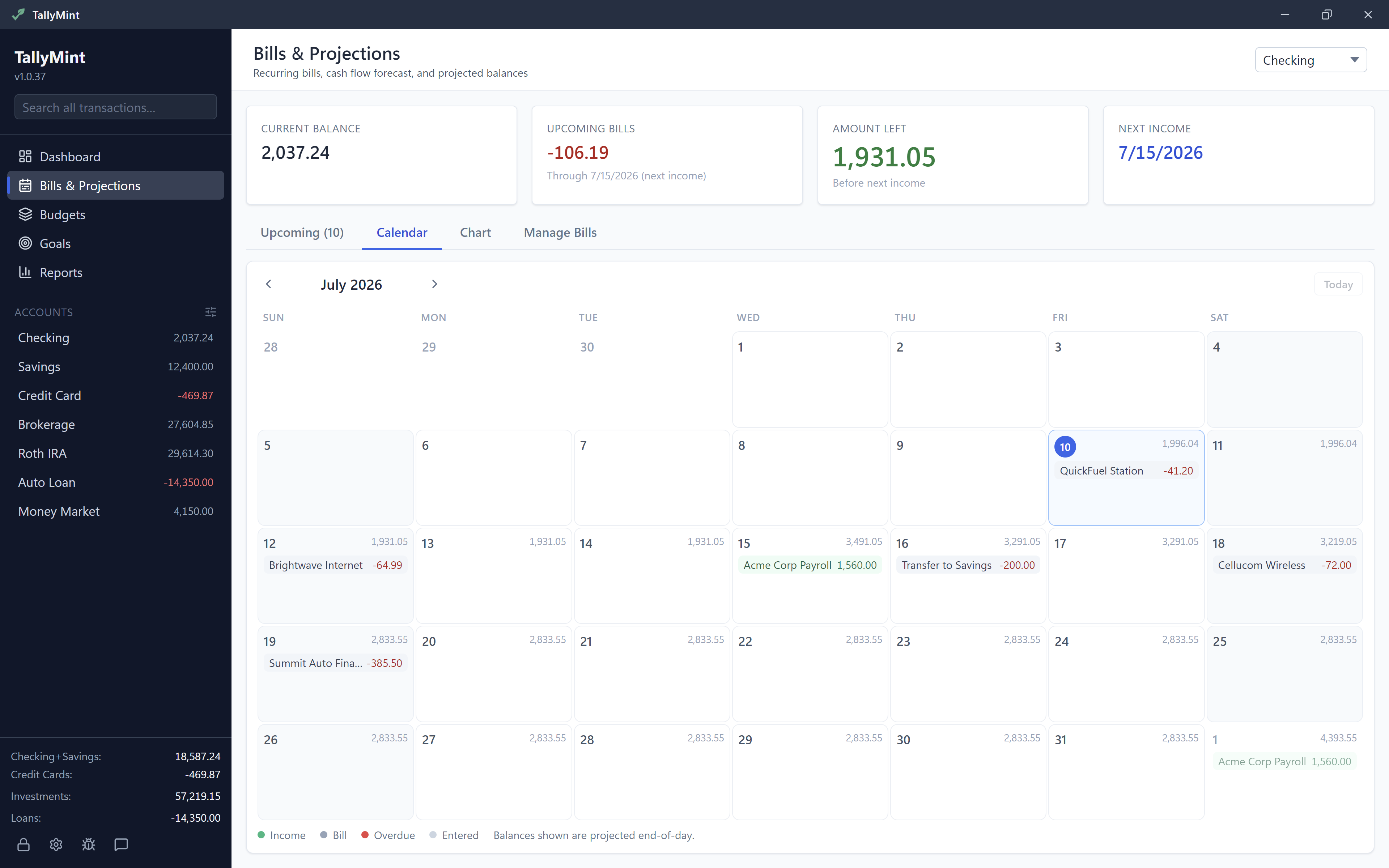
Track every subscription, utility, and paycheck, then see the whole month at a glance on the bills calendar. TallyMint even scans your register and suggests recurring charges automatically.

QuickFill Entry

Start typing a payee and TallyMint fills in the category and memo from last time, with what you paid then shown right on the suggestion. Repeat entries take seconds, not minutes.

Budgets

Set monthly targets per category. See actuals vs. budget at a glance with color-coded progress. Auto-fill from your spending history.

Savings Goals

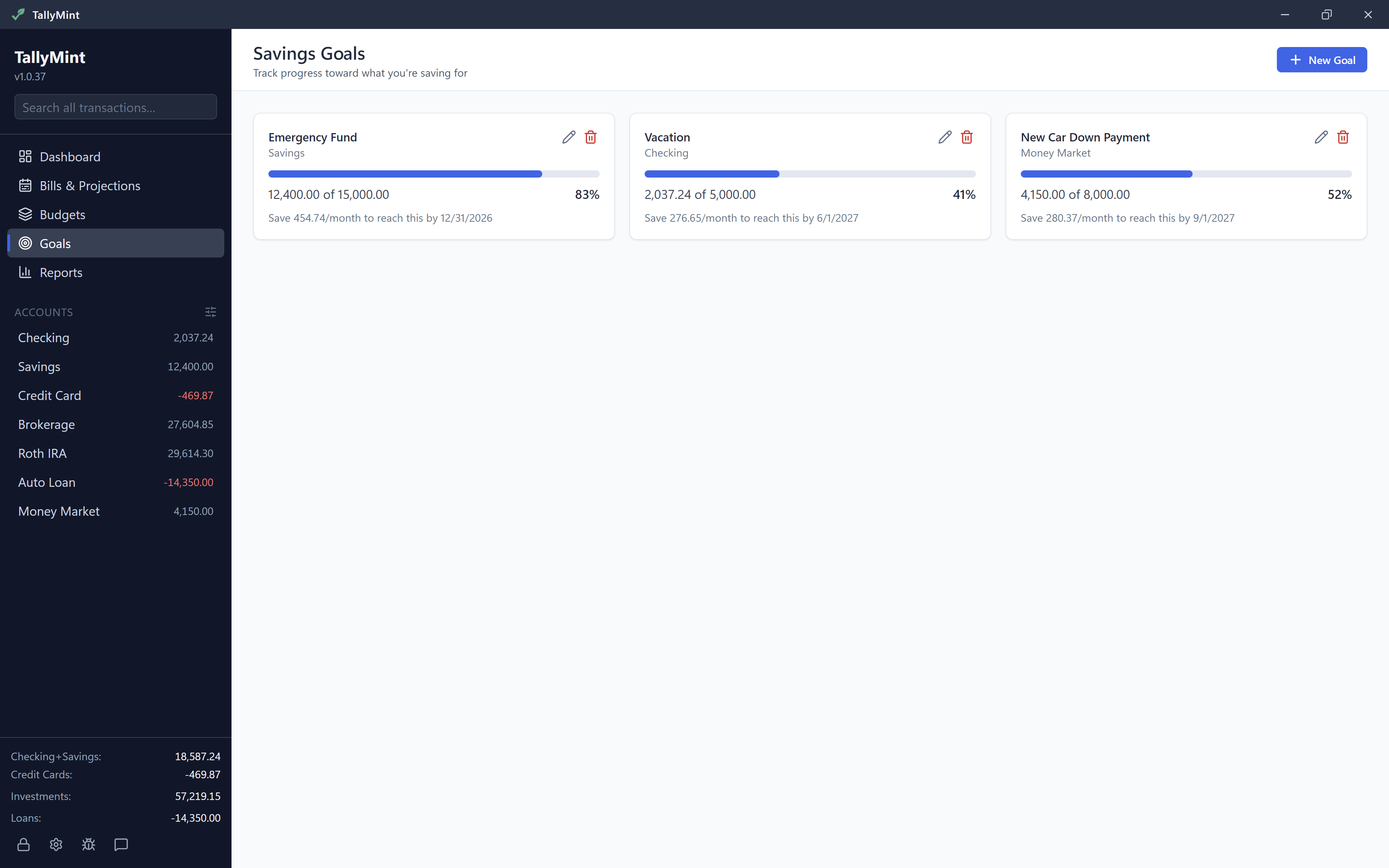
Set a target balance for any account and watch the progress bar fill. With a target date, TallyMint tells you how much to save each month to stay on track.

Loan Amortization

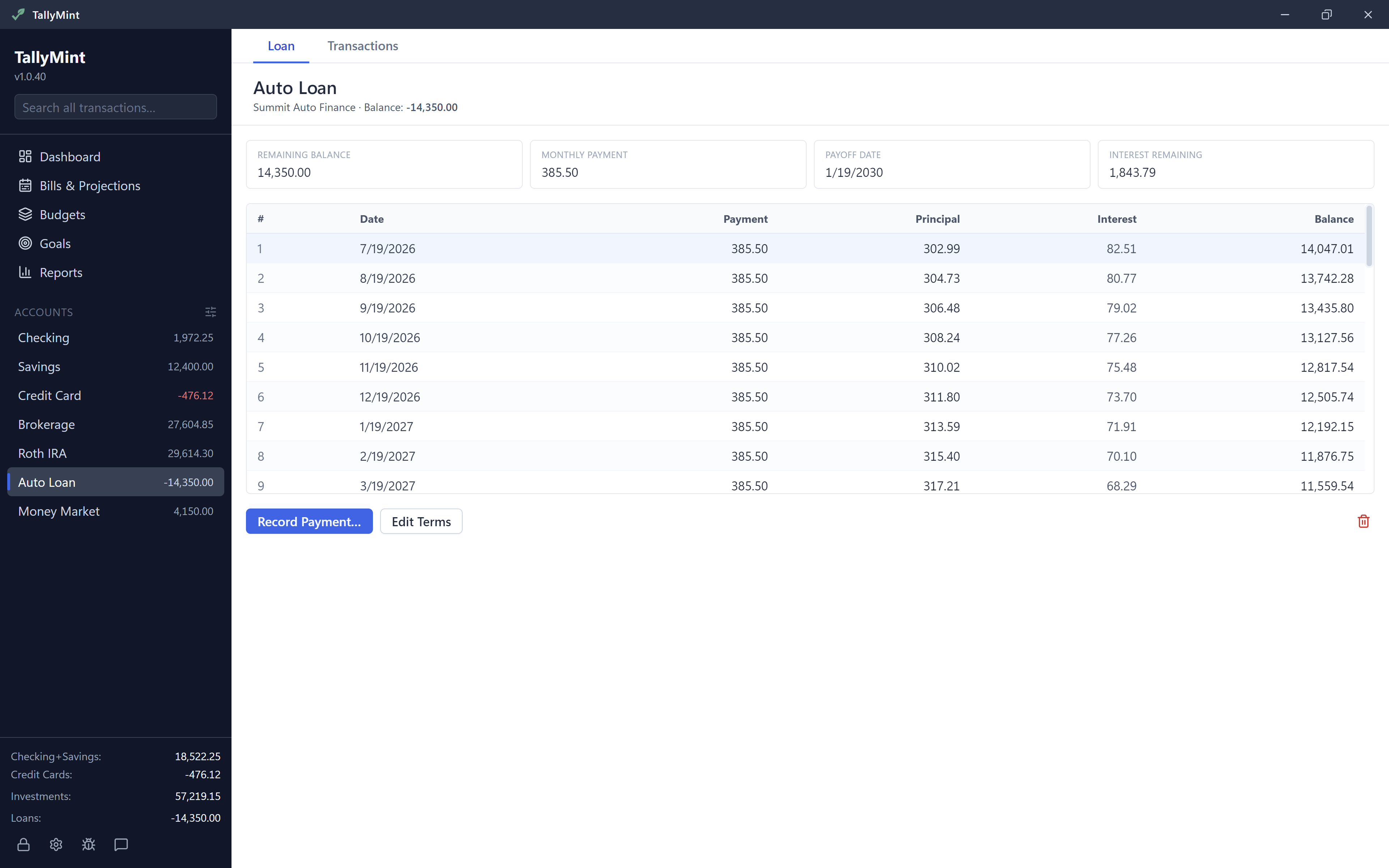
Attach loan terms to any account for a full amortization schedule: payoff date, interest remaining, and one-click payments split into principal and interest.

Investments

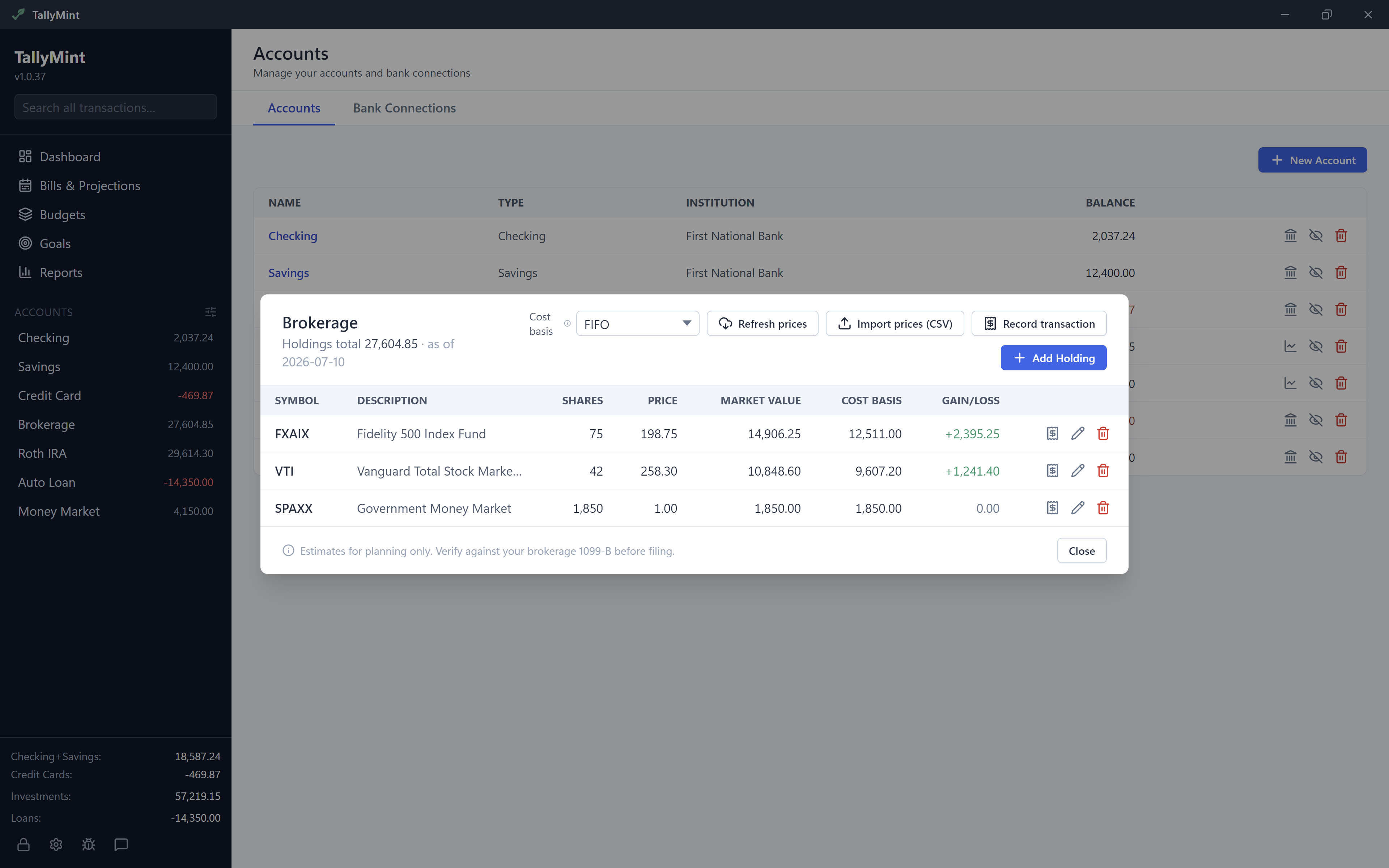
Track brokerage and retirement accounts next to your cash. Positions sync automatically from your bank connection, and prices stay current, mutual fund NAVs included: bundled on the web, or with your own free quote key on desktop. Cost basis and capital gains per lot (FIFO, average, or specific), with long and short-term realized gains.

Import & Migrate

Moving off another program? Import your full history from QIF, OFX, or CSV in a single pass. Accounts, categories, transfers, and even investment history (buys, sells, reinvested dividends, splits) come across automatically with cost basis intact. And there's no lock-in: TallyMint exports your entire file back to QIF anytime.

Reports

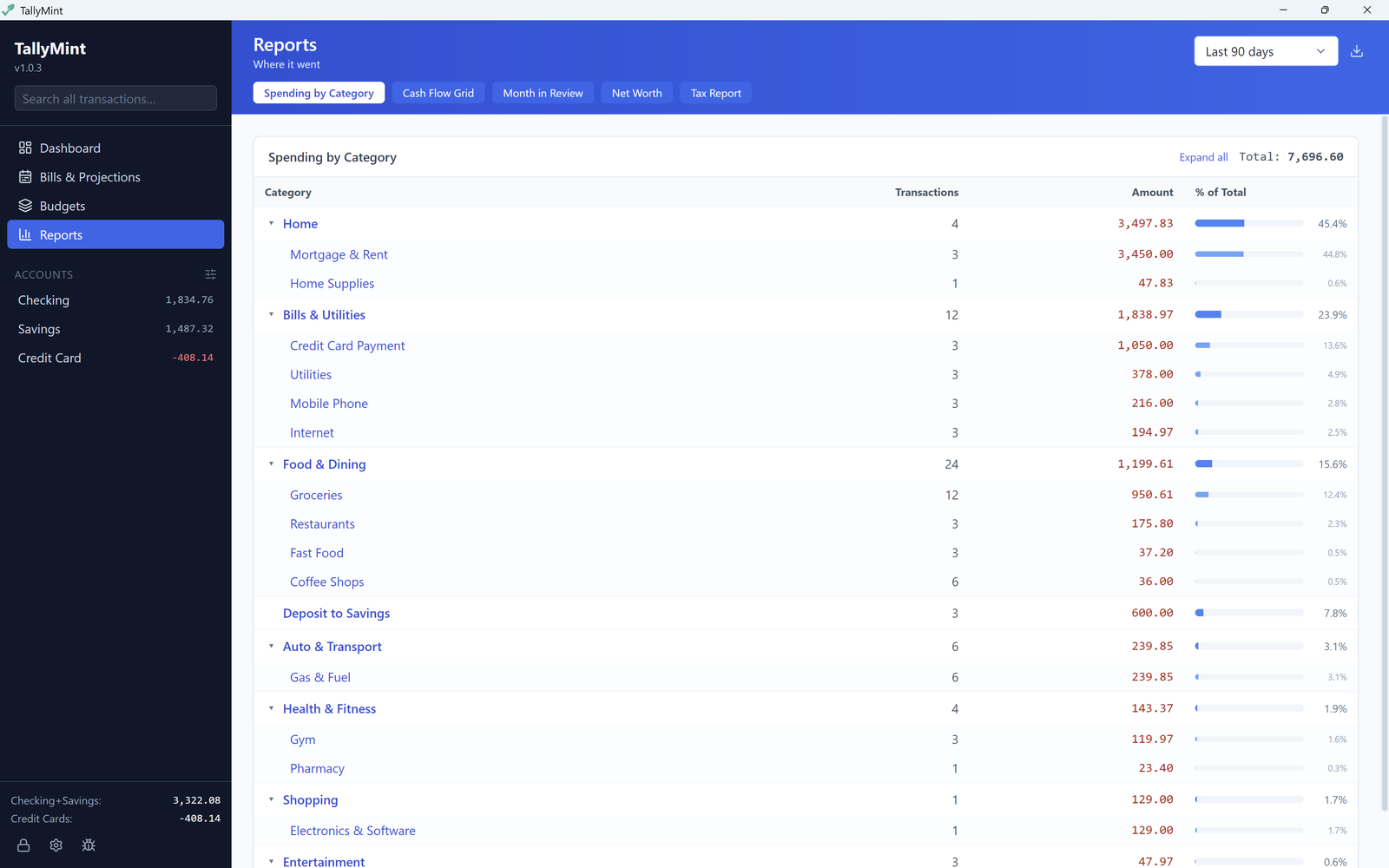
Spending by category, cash flow grids, month-in-review, net worth trends, and tax summaries. Export any view to CSV, and realized capital gains as TXF for TurboTax Desktop and H&R Block Desktop.

Private & Secure

On the desktop your data lives in a single encrypted file on your computer, locked with a master password and Argon2id. On the web it lives in an encrypted database that isolates every account from every other one, and bank access is read-only: TallyMint can never move your money.

Windows or Browser

Run TallyMint as a native Windows app, or subscribe to TallyMint Web and open the same app on any computer, tablet, or phone. Nothing to install, and your bank connections come with the subscription.

Light or Dark

A proper dark theme, with every chart, badge, and report tuned for it. One click to switch, and TallyMint remembers your choice.

Automatic Backups

The desktop app keeps rolling backups of your data file so a bad import or a bad day is always one restore away. On the web, backups are our job, not yours.

See TallyMint in action

Real screenshots, real workflows. Here's what managing your money in TallyMint actually looks like.

Click any screenshot to enlarge it. Use the arrows to flip through them all.

TallyMint transaction register showing a checking account with payees, categories, cleared status, and a running balance column
TallyMint Bills and Projections view showing a 90-day cash flow forecast chart with the projected checking balance on a future date
TallyMint Budgets view showing monthly category targets with actual versus remaining amounts across several months
TallyMint bills calendar showing a full month of bills and income with projected end-of-day balances on every day
TallyMint Investments holdings view showing brokerage positions with shares, prices, market values, cost basis, and gain/loss per holding
TallyMint Savings Goals view showing goal cards with progress bars and how much to save per month to reach each target date
TallyMint loan terms and amortization schedule showing payoff date, interest remaining, and per-payment principal and interest breakdown
TallyMint Reports view showing spending by category with transaction counts, amounts, and percentage-of-total bars

Watch the TallyMint demo

A quick tour of TallyMint: register, bills calendar, budgets, goals, investments, and reports in under a minute.

New

TallyMint Web: the same app, in your browser

Everything you just saw, running at app.tallymint.app. Nothing to install, your bank connections included, and the same ledger open on your laptop and your phone.

1

Create your account

Create your account with your email address or your Google account. It takes a minute and costs nothing.

2

Pick your plan

The app opens with a Choose a plan button. Pick Standard or Plus, monthly or yearly, and your 7-day free trial starts. A card is required to start the trial, and you can cancel any time before it ends.

3

Connect your banks

Link an account and TallyMint sets it up for you, opening balance and all. Bringing history from another app instead? Import your QIF, OFX, or CSV file and start there.

  • Bank connections included, no keys to buy or configure
  • Read-only bank access: TallyMint can never move your money
  • Works on Windows, Mac, Linux, iPhone, iPad, and Android, in the browser you already use
  • Light and dark themes, one click apart
  • Import from Quicken and friends: QIF, OFX, and CSV
  • Export your whole ledger to QIF or CSV whenever you want, including after you cancel
Start your free trial How TallyMint Web works

Already subscribed? Sign in here. Cancel and your account turns read-only rather than closing: you can still open your data and export it.

Desktop or Web: what's actually different

The features are the same in both. What changes is where it runs, where your data lives, who handles the bank connections, and how you pay.

TallyMint Desktop TallyMint Web
Price $49.99 once $12.99/mo or $99.99/yr
Free trial 30 days, no card needed 7 days, card required
Runs on Windows 10 & 11 Any browser, phone and tablet included
Where your data lives An encrypted file on your PC Our encrypted database, walled off per account
Works offline Yes, completely No, needs a connection
Bank connections Your own SimpleFIN key, or OFX direct from your bank Included, through Plaid
Connected accounts As many as your provider allows Up to 5 on Standard, 14 on Plus, more for $0.99/mo each
Investment prices Your own free quote key, or from bank sync Included, no key needed
Account required None. Nothing to sign up for Yes, email or Google sign-in
Features Register, budgets, bills, projections, goals, loans, investments, reports, import, export, dark mode The same list, same numbers
Updates Bug fixes and patches included Always the latest, nothing to install

Both read the same file formats, so nothing traps you in one of them. Export from the desktop app and import into the web app, or the other way around, whenever you like.

How TallyMint compares on price

Two ways to pay, and you pick the one that fits how you think about software.

Buy once, and own it

$49.99, one time. The Windows app is yours, the data file is yours, and there is no renewal date on your calendar. Bug fixes and patches are included. And our pledge stands: if TallyMint ever stops being developed, we will ship a final free update that removes license verification entirely, so the app you paid for keeps working.

Personal finance software with a one-time purchase has become rare. We intend to keep selling it.

Or subscribe, and we run it

$12.99 a month, or $99.99 a year. The subscription covers the parts you would otherwise arrange yourself: your bank connections, end-of-day investment prices, hosting, and backups. Nothing to buy separately, nothing to configure, and it works from any device you sign in from.

Hosted finance apps generally run $72 to $150 a year, so TallyMint Web sits in the normal range for what it does. You are paying for the service, not for permission to keep using software you already bought.

Neither model is right for everybody, which is exactly why we sell both.

Pricing

Buy the Windows app once, or subscribe to the hosted one. Every plan includes every feature.

DESKTOP
49.99
one-time. It's yours.
  • Windows 10 and 11
  • Your data in a file you own
  • Bug fixes and patches included
  • Instant license key by email
  • Up to 3 machine activations
  • Email support
Buy Now - $49.99 or start the 30-day free trial
30-day money-back guarantee, no questions asked
No subscription. No account needed
WEB PLUS
17.99
per month, or $139.99 a year
  • Everything in Web Standard
  • Connect up to 14 accounts
  • Built for several banks at once
  • Room for brokerage and retirement accounts
  • Backed up and available everywhere
  • Email support
Start free trial how the signup works
7-day free trial, cancel any time
Sign up first, then pick this plan in the app

Frequently asked questions

Getting started

TallyMint (also written Tally Mint) is personal finance software that comes two ways: a Windows desktop app you buy once for $49.99, and TallyMint Web, a hosted version you subscribe to and use in any browser. Both handle bank sync, budgets, recurring bills, a monthly bills calendar, savings goals, loan amortization, investment tracking, cash flow projections, and reports. The desktop app keeps your data in a single encrypted file on your own PC with no account and no subscription. TallyMint Web runs on our servers and includes the bank connections.

The features are the same in both, down to the numbers they report. What differs is how you run and pay for it. Desktop is a Windows app for a one-time $49.99, your data lives in an encrypted file on your PC, it works with no internet at all, and you bring your own bank connection (a SimpleFIN key or OFX direct from your bank). TallyMint Web is $12.99 a month or $99.99 a year, runs in any browser, including on a tablet or phone, stores your data in our encrypted database, and includes the bank connections through Plaid. Full breakdown here, or see the side-by-side table.

Three steps. First, go to app.tallymint.app, choose Sign up, and create your account with your email address or your Google account, which is free. Second, the app opens with a Choose a plan button: pick Standard or Plus, monthly or yearly, and your 7-day free trial starts. A card is required to start the trial, and you can cancel before it ends. Third, connect your banks or import a QIF, OFX, or CSV file. The web setup guide walks through all of it with nothing assumed.

The desktop app needs Windows 10 or Windows 11 (64-bit). It is a lightweight native app: it installs in seconds, needs no account, and works offline. TallyMint Web needs nothing but a current browser and a connection, so any operating system works, phones and tablets included.

Yes. TallyMint imports QIF files (used by most desktop finance apps), OFX/QFX bank downloads, and CSV files. Your accounts, transactions, categories, splits, and transfers all come over in seconds.

Pricing, billing & refunds

Web Standard is $12.99 a month or $99.99 a year and connects up to 5 accounts. Web Plus is $17.99 a month or $139.99 a year and connects up to 14. Every plan has every feature; the difference is how many bank accounts you connect. Extra connected accounts are $0.99 a month or $11.88 a year each if you need more than your plan covers. Both plans start with a 7-day free trial, and you can switch plans or cancel yourself from Settings at any time.

Either way, TallyMint goes read-only rather than locking you out. You can still view and export all your data. On the desktop, buy a license any time to unlock editing again. On the web, subscribe from Settings and you are back in business. Your data is never deleted or held hostage.

Yes, yourself, from Settings inside the app. No email, no phone call, no retention maze. You keep access until the end of the period you already paid for. After that your account turns read-only rather than closing: you can still sign in, look at everything, and export your whole ledger to QIF or CSV. Your bank connections are disconnected when the subscription ends. Come back later and subscribing again picks up where you left off.

Desktop purchases come with a 30-day money-back guarantee, no questions asked. Email support@tallymint.app with your order number and we will refund you in full. TallyMint Web works differently, because the free trial is there to answer that question before you are charged: cancel during the trial and you pay nothing, and cancelling later stops the next renewal while you keep access through the period you already paid for. Subscription periods are paid up front and are not automatically refundable, but if you think a charge was a genuine mistake, email us and we will look at it.

Bug fixes and patches are always included with your desktop purchase. TallyMint Web is always on the latest version already, with nothing for you to install.

Your data & privacy

That depends on which one you use, and we are straight about it. With the desktop app, no: your data lives in a single encrypted file on your computer, and TallyMint never sends your financial data to our servers. You can put that file in Google Drive or OneDrive for backup if you want to. With TallyMint Web, yes by definition, because that is what makes it work in a browser: your ledger lives in our encrypted database, every account is walled off from every other one at the database level, and bank access is read-only. If keeping your finances entirely off other people's servers is the point for you, buy the desktop app. That is exactly why we still sell it.

On the desktop, TallyMint connects through SimpleFIN Bridge ($15/yr, paid to SimpleFIN, not us), which covers thousands of US and Canadian banks and credit unions via MX. OFX Direct Connect is also supported for banks that offer it (Chase, Bank of America, and others). TallyMint Web uses Plaid instead, included in the subscription, which covers thousands of US banks and credit unions with no key to buy or configure. Either way the access is read-only: TallyMint can never move your money.

On the desktop there is no recovery, by design. Your file is encrypted with your master password and the password is stored nowhere, so nobody, including us, can read your data without it. Keep the password in a password manager, and let TallyMint's automatic backups protect you from everything else, like disk failure. TallyMint Web has no master password at all: you sign in to your account, so a forgotten password is a normal password reset.

Yes, in either direction, with a TallyMint transfer file that both apps can export and import. It carries your whole workspace: accounts and groups, transactions with splits and transfers, investment history and holdings, categories, budgets, recurring bills, payee rules, savings goals, and loan details. Export from one, import into the other, and you pick up where you left off. Standard QIF export is also there for other programs. The two are separate products with separate data, though, so they do not sync with each other in the background: moving your data is something you do deliberately, not something that happens live.

With the desktop app, nothing. Your data lives in a single file on your own disk, not on our servers, and you can export everything to QIF or CSV at any time. There is no account to lose and no server that holds your finances. And our pledge stands: if TallyMint ever stops being developed, we will release a final free update that removes license verification entirely, so the app you bought keeps working forever. For TallyMint Web the honest answer is that a hosted service depends on us being here, which is why the desktop app exists and why the web app exports your entire ledger to QIF and CSV on demand. If we ever had to wind the hosted product down, subscribers would get notice and a full export well before anything stopped.

Features & platforms

Yes. Create your own named groups, like Everyday, Retirement, or Property, and the account sidebar shows each group with its own subtotal. Groups collapse out of the way, and you can drag accounts between them. Grouping only changes how the sidebar is organized: reports, projections, and net worth are unaffected.

Yes, in both the desktop app and the web app. Every chart, badge, and report was tuned for it rather than inverted and hoped for. Switch it from the sidebar in the desktop app or your account menu on the web, and TallyMint remembers your choice. Light stays the default.

Yes. Your data is a single file you copy over, and your license includes up to three machine activations, so a new PC alongside or replacing your old one is covered. Install TallyMint, open your file, enter your license key, and you are back in business. The backups and data guide walks through it. If replaced hardware ever uses up your activations, email support@tallymint.app and we will sort it out. On TallyMint Web there is nothing to move at all: sign in on the new machine and your ledger is there.

Yes, through TallyMint Web. It runs in the browser, so a Mac, a Linux box, an iPhone, or an Android phone all work, and the phone layout was built for a phone rather than shrunk down. The downloadable desktop app is still Windows-only. If you specifically want a native Mac or Linux build, say so at support@tallymint.app: the underlying technology supports both and demand is what decides it.

Take control of your finances. Your way.

Try the Windows app free for 30 days with no card, and keep it for $49.99 once. Or start a 7-day trial of TallyMint Web and have your banks connected in minutes. Same app, same numbers, whichever fits you.

Get TallyMint from the Microsoft Store

Hear about major updates

More from KS-ByteBox

TallyMint is made by KS-ByteBox, an independent Windows software studio. Every app is a one-time purchase that runs entirely on your PC.

ByteTidy icon

ByteTidy $19.99 one-time

Duplicate file finder and storage cleaner. Hash-verified matches, OneDrive safe, deletes go to the Recycle Bin.
Get ByteTidy from the Microsoft Store
FlipConvert icon

FlipConvert $8.99 one-time

Batch image converter. Drop in files or whole folders: HEIC, WebP, PNG, JPG, and more, in and out.

Get FlipConvert from the Microsoft Store

See all KS-ByteBox apps