Tracking investments in TallyMint
TallyMint tracks brokerage and retirement accounts alongside your everyday ones: holdings, market values, cost basis, and realized capital gains. Your broker can feed the numbers through bank sync, or you can keep an account by hand.
Step 1: Create an investment account
Add an account and choose the Investment type for each brokerage, IRA, or 401(k) you want to track. An investment account is valued from its holdings rather than a single running balance, so once it has positions its total is the sum of their market values.
Step 2: Populate the account
There are two ways to fill an investment account with holdings.
Option 1: Bank sync
Connect the account and your broker feeds the holdings directly: symbols, share counts, and market values all come across, and a Cash row keeps the account total matching the balance your broker reports. This is the least-effort option because your positions update whenever you sync. In the Windows app that connection goes through SimpleFIN, covered in the bank sync guide; on TallyMint Web it is included in your subscription and set up from Bank Connections, covered in the web setup guide. Either way, be sure the account is the Investment type before you map it.
Option 2: Enter holdings manually
Open the investment account to see its holdings, then:
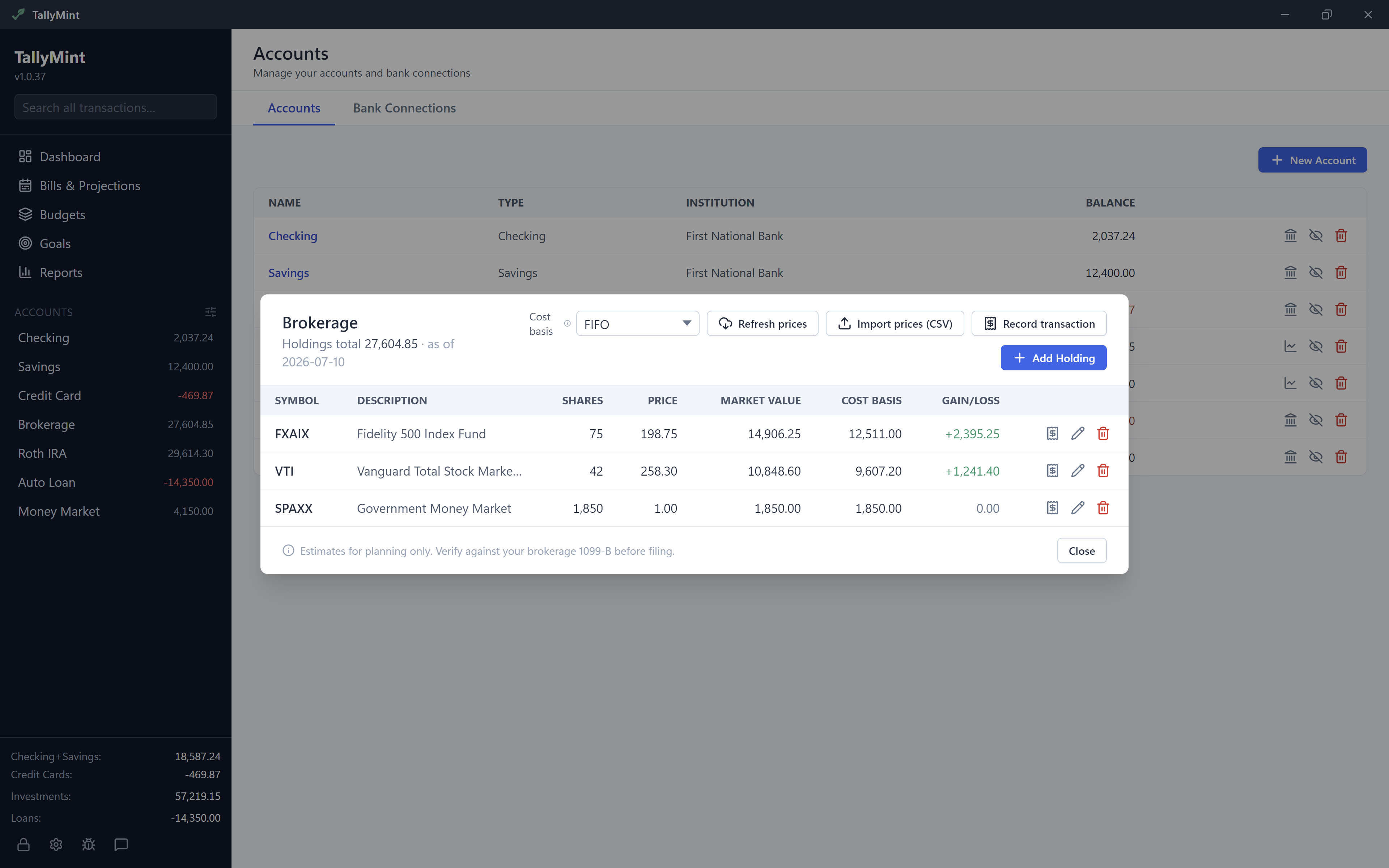
- Use Add Holding to add a position with a symbol, share count, and optional price.
- Use Record transaction to log a buy, sell, dividend, reinvested dividend, or split. Recording buys and sells is what lets TallyMint track cost basis and gains per symbol.
Manual and synced accounts work the same way once populated, and you can record transactions on a synced account too.
Step 3: Choose a cost-basis method
TallyMint computes cost basis and realized capital gains for you, and you choose how sells pick which shares to sell:
- FIFO sells the oldest shares first.
- Average cost blends all shares to a single cost.
- Specific lot sells the highest-cost shares first, the usual choice for tax-loss harvesting.
Open a position to see its open lots, realized gains split into long and short term, and its transaction history. You can switch the method per account at any time.
Step 4: Keep prices current
Market values depend on up-to-date prices. TallyMint gives you a few ways to refresh them.
Bring your own quote key (Windows app)
In Settings → Investing, you set up a free end-of-day quote provider with your own API key. TallyMint ships no shared key, and your key is stored inside your encrypted file, so pricing stays yours and free. Two providers are supported:
- Alpha Vantage (free tier): covers stocks and ETFs. Most mutual funds are not covered.
- EODHD: covers stocks and ETFs, and also includes US mutual fund NAVs. Choose EODHD if you hold mutual funds.
Once a key is saved, use Refresh prices in the account to pull the latest end-of-day quotes.
Import a price CSV
For anything a quote provider does not cover, use Import prices (CSV) to load a simple symbol,price file (an optional date column is supported). This is handy for hard-to-quote holdings or funds outside the provider's coverage.
Synced positions update on sync
Positions that come from your broker with a bank connection carry their market values with them, so a sync refreshes them without a quote key at all.
On TallyMint Web
There is no quote key to set up, because prices are part of the subscription. Investment accounts you connect bring their holdings and market values down with them on every sync. For holdings you entered by hand, Refresh prices pulls end-of-day quotes using our own market-data feed, so you get the same result without an API key, an account, or a provider choice. Cost basis and realized gains work exactly as described above either way.
Importing investment history from Quicken
If you are moving from Quicken, QIF investment imports create cost-basis history automatically: buys, sells, reinvested dividends, and splits come across as real cost-basis transactions rather than plain balances. See the QIF import guide for how investment accounts are handled during import.