Tracking loans and mortgages in TallyMint
A loan in TallyMint knows its own math. Enter the terms once (rate, payment, payment day) and it computes the full amortization schedule. Record a payment and TallyMint splits principal and interest for you.
Step 1: Create the loan account
Add an account with the Loan type and enter what you currently owe as the opening balance. It shows in the sidebar as a negative balance, because it is money you owe, and it feeds the Net Worth report as a liability.
Step 2: Attach the loan terms
Open the loan account and enter the terms:
- Annual rate %: the loan's interest rate.
- Monthly payment: the regular principal-and-interest payment. For a mortgage, use just the principal and interest portion, not escrow; taxes and insurance are ordinary categorized spending.
- Payment day of month: when the payment is due.
- Interest category: where interest lands in your spending (for example a Mortgage Interest category, handy at tax time).
- Original amount (optional): the amount you first borrowed, for the payoff progress display.
The schedule is computed from the account's current balance forward, so a loan you are five years into is entered in seconds; no need to reconstruct history.
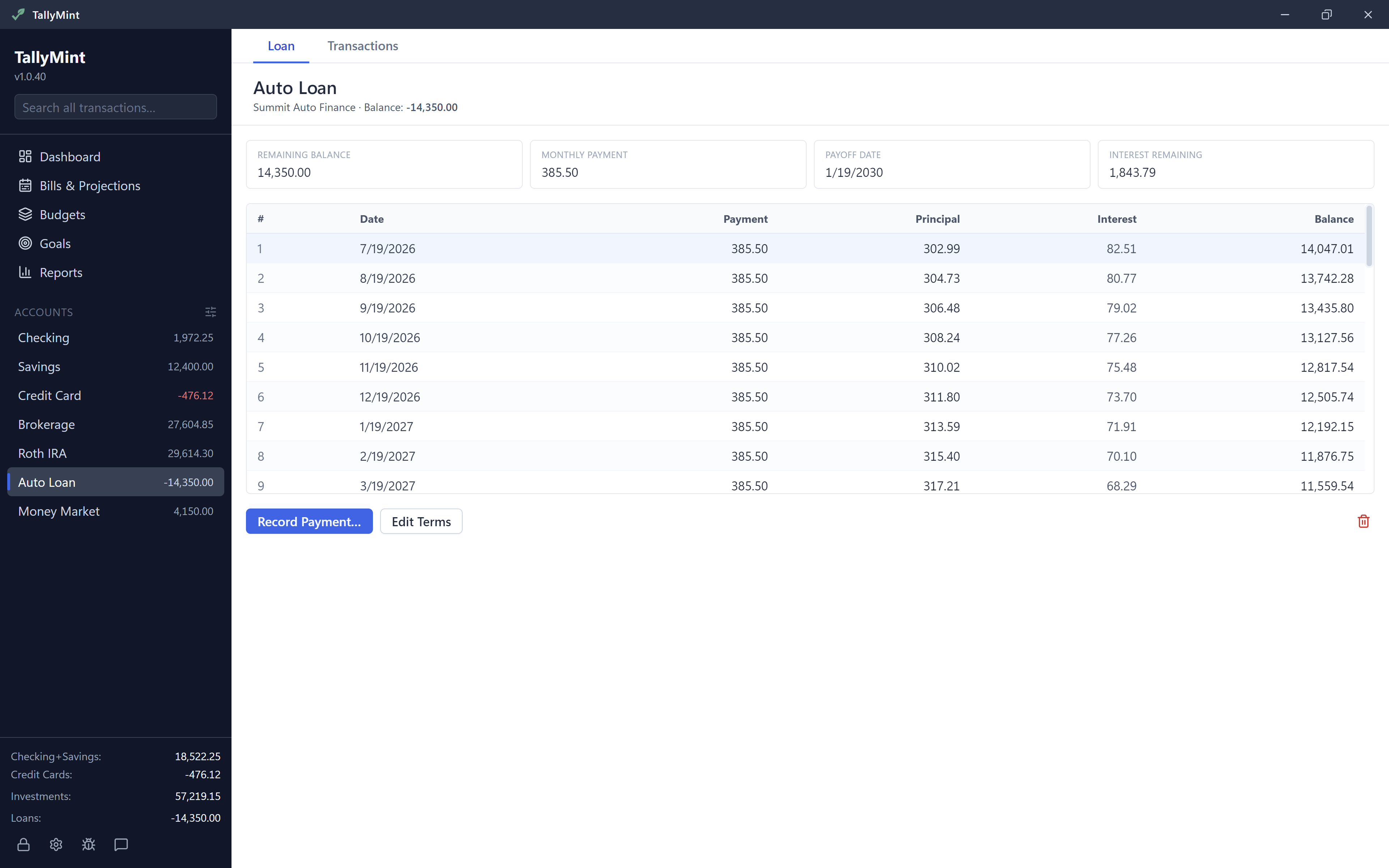
Step 3: Read the schedule
The schedule lists every payment between now and payoff with its principal portion, interest portion, and the balance after. Above it, summary chips show the remaining balance, monthly payment, and total interest remaining. If the payment you entered does not cover the interest, TallyMint says so plainly instead of showing a schedule that never ends.
Step 4: Record payments
How you record a payment depends on which accounts download from your bank. A payment your bank downloads is already in TallyMint, so recording it again counts it twice.
If the loan is linked to your bank
Skip Record Payment. Usually the payment arrives in the loan's register on its own. Link it to the account it came from:
- The paying account downloads too: right-click the payment and choose Pair as transfer…. On a phone, tap More actions on the payment and choose it there. Pairing needs both rows downloaded, opposite amounts to the cent, posted within 4 days of each other in the last 90 days, and neither row tied to a recurring bill.
- You track the paying account by hand: edit the payment in the loan's register and pick the paying account under Transfer to account in the Category column. TallyMint adds the matching row to that account.
Some lenders send only the balance, with no payment rows. If no payment shows up in the loan's register, split the bank's row in the paying account's register, or enter the payment there if it didn't download: the principal as a transfer to the loan, the interest to your interest category.
If the paying account downloads but the loan doesn't
Skip Record Payment for that account. When the payment arrives, split the downloaded row: the principal as a transfer to the loan, the interest to your interest category. Paid from an account that doesn't download? Choose that one in Record Payment. Paid before the account was linked and it didn't download? Enter it in the register.
Already recorded one of these? Delete the interest row and the transfer Record Payment added, from the paying account's register. Keep the bank's rows: they are your bank's record of the payment.
If you track both by hand
Use Record Payment:
- Pick the account the payment comes from (usually checking) and confirm the total and the interest portion; TallyMint pre-fills them from the schedule, and the principal is derived automatically.
- TallyMint then books two things at once: the interest as spending in your interest category, and the principal as a transfer from the funding account to the loan, which reduces what you owe.
That split is the part loan tracking usually gets wrong when done by hand. Booked this way, your checking account drops by the full payment, the loan balance falls by exactly the principal, and only the interest counts as spending in reports and budgets. Imported this payment from a bank file? Don't record it again with Record Payment.
Tips
- Recording payments by hand and want them in your bills calendar and balance forecast? Add a recurring bill with auto-enter off, and choose Skip this one on that month's bill once you record the payment. With auto-enter on, the bill would book the payment a second time.
- Tracking both accounts by hand? Extra principal payments are just a transfer from checking to the loan; the schedule recomputes from the new balance and shows the payoff coming sooner.
- Point the interest side at the built-in Mortgage Interest category and it shows up in the Tax Report automatically. Using a category of your own instead? Tick Tax relevant on it in Settings > Categories and it counts the same way.