Recurring bills and the bills calendar
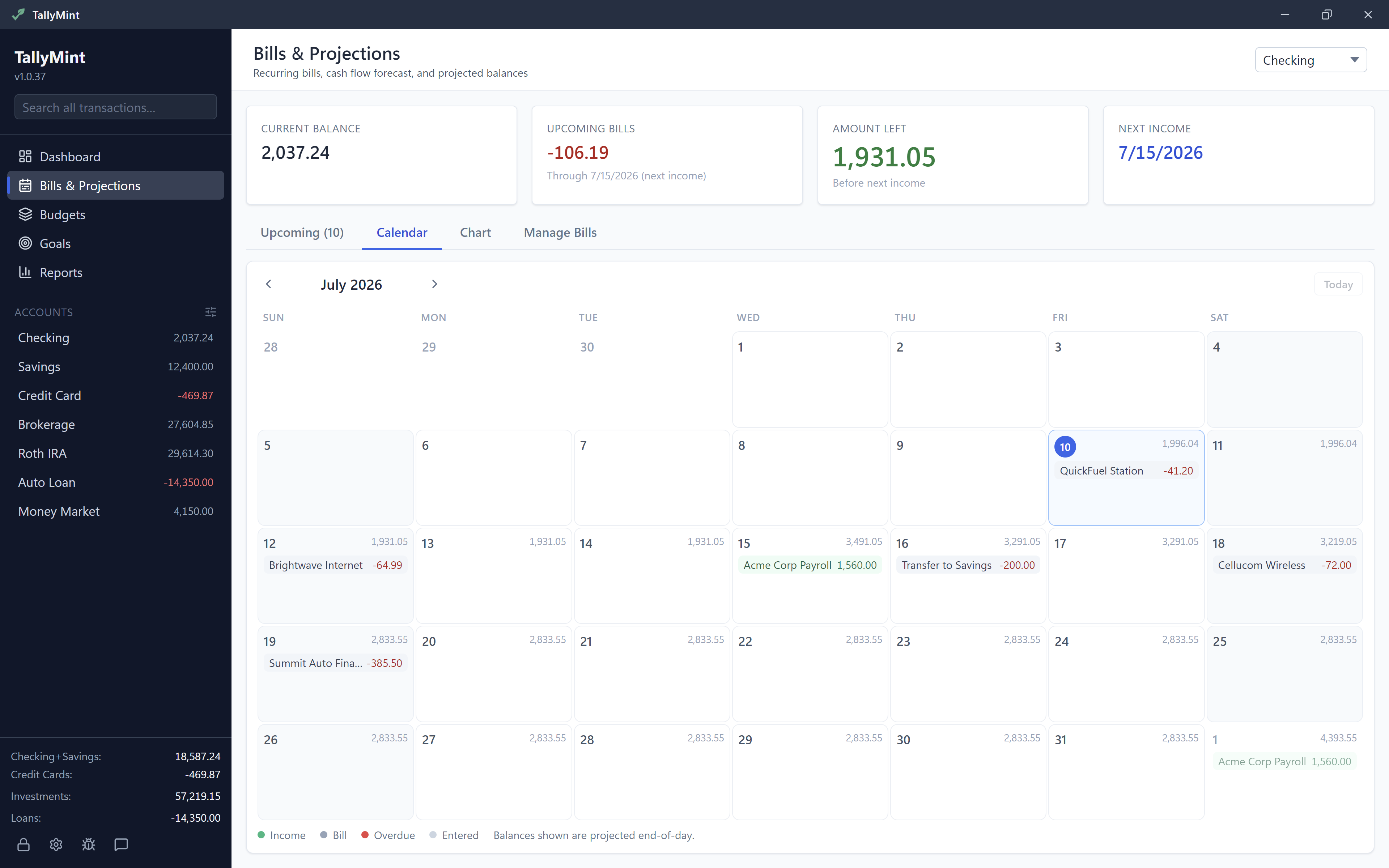
Recurring bills are rent, utilities, insurance, subscriptions, and paychecks, each entered once with a schedule. They fill the calendar, drive the balance forecast, and can enter themselves in the register on their due dates or a set number of days earlier. It all lives in Bills & Projections: Upcoming, Calendar, Chart, and Manage Bills.
Adding a bill (or a paycheck)
Click New Bill, at the top of Upcoming, Calendar, and Chart or in Manage Bills, and add each recurring item with its payee, amount, account, category, and how often. The form stays short: More options holds an interval you can widen (monthly every 2 months, for instance), the day of month or weekday, and an end date. It opens by itself when a bill uses any of them. Frequencies cover real bills: weekly, bi-weekly, twice a month (the 1st and 15th), monthly, quarterly, and yearly. Income works the same way; a paycheck is just a recurring deposit, and entering yours is what makes the forecast worth reading.
Bills and income stay reminders until they are entered into your register. A first due date in the past is fine: with Enter automatically on, payments are added from today forward, never for earlier dates. Add an older payment to your register yourself if you want it there. With it off, any payment due in the last 30 days shows as overdue until you enter or skip it.
Auto-enter, or confirm by hand
Each bill has one decision attached: auto-enter, on or off.
- Auto-enter on (the lightning bolt): the transaction posts to your register by itself, without you clicking anything. Right for fixed, predictable amounts like rent, a mortgage payment, or a streaming subscription. Recording a loan's payments with Record Payment? Leave that bill's auto-enter off, or the payment books twice.
- Auto-enter off: the bill appears in Upcoming when due and waits for you. Right for variable amounts like a utility bill, where you confirm the real number as you enter it.
Already paid it yourself? If your register has a payment to the same payee for the exact amount, dated on the due date or a few days before it, auto-enter counts it as paid and does not post the bill a second time.
How far ahead an auto-entered bill posts
With auto-enter on, each bill also carries a number: Enter this many days early. Leave it at 0, the default, and the bill posts on its due date, which is how auto-enter has always worked. Raise it, up to 90 days, and the bill posts that many days early instead. Set 3 on your mortgage and it lands in the register three days before it is due.
The date on the transaction does not change either way: an early-posted bill still carries its due date, not the day it was posted. A bill due on the 19th that posts on the 17th is dated the 19th. So entering early does not move the money on your forecast, it only puts the row in your register sooner, where you can see it and where your projected balance already accounts for it. Existing bills are unchanged: they sit at 0 until you change them.
Working the Upcoming list
The Upcoming tab is the short answer to "what is due soon": each occurrence with its date, payee, and amount. From here you can enter an item into the register, edit the underlying bill, or skip an occurrence you will not pay this cycle (a paused subscription, a waived fee). One thing to know: skipping removes that occurrence for good, so if you actually paid the bill, enter it rather than skipping it.
You do not have to wait for a bill to be due to enter it. If you paid something early, or you just want it in the register now, enter the future occurrence straight from the list. It posts dated on its due date, not on the day you clicked, so the bill stays where it belongs in your register and in your forecast.
When several are due at once, you can do them together. Every row has a checkbox, with one in the header that selects the whole group, and an Enter selected button that shows how many you have ticked. Tick the bills you want, or select all, and enter them in one go. Before anything is written you get a confirmation naming how many bills and the total amount, and each one posts dated on its own due date. Overdue bills and upcoming bills are two separate groups with their own checkboxes and their own button, so clearing a backlog of overdue items never touches anything that is not due yet.
Anything left unentered past its due date stays in the list flagged as overdue for 30 days, so a week away from the app never costs you a bill. Deal with it inside that window: occurrences older than 30 days drop out of both the list and the forecast.
See upcoming bills in your register
Every register except an investment account has a calendar button in its toolbar (Show upcoming bills in this register). Pick Next 15 days, Next 30 days, Next 60 days, or Next 90 days and that account's scheduled bills appear as preview rows on the future side of the Future divider, each with a projected balance. It is off until you turn it on, and the choice is kept per register. Choose Turn off for this register to switch it off again.
Preview rows are marked with a clock icon (Scheduled bill, not entered yet) and are not part of your register. Hover over one for the same buttons as the Upcoming list: Enter into register, Skip this one, and More actions, which also has Edit this instance... and Edit all future.... Right-clicking the row or clicking its icon opens the same menu, and on a phone you tap the row. Entering it posts a real row on the date you choose and the preview goes away.
- Gone once it is dealt with. A preview disappears when its bill is entered, skipped, or auto-entered.
- Hide and show in one click. Click the button to hide the previews for now and click it again to bring them back, still on the window you chose.
Choosing which account you are looking at
Bills & Projections has an account picker at the top. Leave it on one account to work that account's bills, or choose All accounts to see every bill you have in one list, whichever account each one pays from. Each row says which account it belongs to, so nothing gets confused. Projected balances are the one thing All accounts leaves out, on the chart and on the calendar alike: a projected balance belongs to a single account, and TallyMint will not invent a combined one rather than tell you the truth. Pick an account when you want the forecast.
The calendar and the forecast
The Calendar tab lays the month out day by day, the fastest way to sanity-check a tight stretch ("three bills land the day before payday"). The Chart tab is the payoff: your projected balance 30, 60, or 90 days out, computed from these same bills and income. The better your bill list, the more trustworthy that line; the forecasting guide covers reading it.
Tips
- Start with the bills that hurt when forgotten: rent or mortgage, insurance, anything on autopay at the bank.
- For variable bills, enter a typical amount; the forecast uses it as the estimate and you confirm the real number each cycle.
- If you use bank sync, entered bills match against the bank's version of the transaction when it arrives, so nothing double-counts.
- Editing a bill's amount, payee, or category changes its future occurrences; what is already in your register stays put. Change the schedule (the day of month, the frequency, or the dates it runs between) and an occurrence you have already entered moves to the nearest new date when one is close, so the bill still knows what is paid and what is due next. An edit never adds past-dated rows to your register: changing the schedule, moving its dates or turning the bill back on only affects payments from today forward. An unchanged bill still catches up on payments it missed while the app was closed. Turning Enter automatically on also takes the unpaid past dates of that bill off the Overdue list, even if you turn it off again.