Reconciling your accounts in TallyMint
Reconciling means checking your register against the bank's statement so you know both agree. TallyMint keeps this simple: every transaction is either cleared (the bank has it) or uncleared (it has not shown up at the bank yet), and the register always shows a running Cleared balance. When that number matches your statement's ending balance, you are reconciled.
How cleared status works
- Every register row has a status cell. A small amber dot means uncleared; a small green C means cleared.
- Click the status cell to toggle a single transaction, or right-click the row and choose Mark cleared. On a phone, tap More actions on the row and choose it there.
- To clear a batch at once, select multiple rows and use Mark Cleared from the selection toolbar.
- Transactions that arrive through bank sync are marked cleared automatically when you accept them, because the bank has, by definition, already posted them. Manual entries start uncleared.
If you are coming from software with a separate third "reconciled" state: TallyMint intentionally folds that into cleared. One flag is enough to answer the question reconciliation actually asks, "has the bank seen this?", and it means one less state to maintain by hand. QIF imports that carry a reconciled flag come in as cleared.
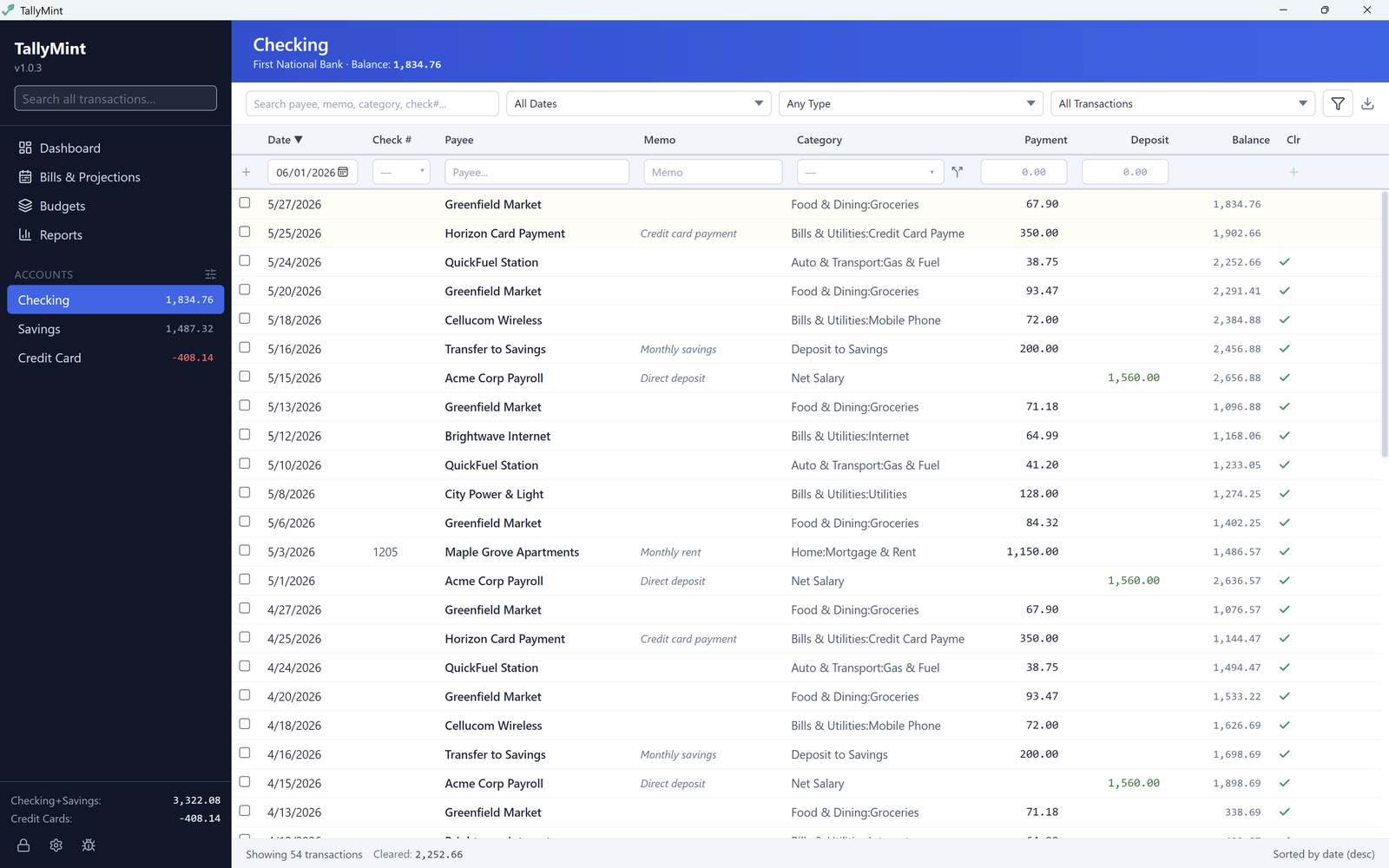
Step 1: Open the account register
Pick the account in the sidebar. In the register footer you will see the account balance and, next to it, Cleared: the balance counting only cleared transactions. The Cleared number ignores any search or filters you have active, so it is always the whole-account truth.
Step 2: Work through the statement
With your bank statement (paper or the bank's website) beside you, go line by line:
- Find each statement transaction in the register and click its status cell to mark it cleared.
- If you use bank sync, most rows will already be cleared and this pass goes quickly; you are mainly confirming nothing is missing.
- If a statement line has no matching register row, add it. If a register row was entered twice, delete the duplicate.
Step 3: Compare the balances
When every line on the statement is marked, compare TallyMint's Cleared balance to the statement's ending balance. Equal means reconciled. Your uncleared transactions (checks that have not been cashed, pending card charges you entered early) are exactly the difference between the cleared balance and your register balance, which is how it should be.
If the numbers do not match
The difference itself is the best clue. Some quick hunts, all from the register's filter bar:
- Filter by status to list only cleared transactions for the statement period, and check the count and amounts against the statement.
- Search for the exact difference as an amount; a single missing or duplicated transaction shows up immediately.
- A difference divisible by 9 often means two digits were swapped when a transaction was typed (for example 54.00 entered as 45.00).
- Check the statement's start date; a transaction cleared in the wrong month shifts both statements it touches.